We make Check-in Pax, one of the six tools below. We list the tools alphabetically, say where each one falls short (including ours) and link to each vendor’s own pages so you can check the details.
The best event badge printing software depends on three things: how many events you run, how much of the event stack you want in one platform, and how much hardware setup you want to own. This guide compares six tools: Accelevents, Bizzabo, Check-in Pax, Cvent OnArrival, Eventleaf and Expo Pass.
Quick picks
- Large enterprise events already on Cvent: Cvent OnArrival
- Design-led conferences and tech events on a full event platform: Bizzabo
- VIP events, galas and agencies that want pay-per-event pricing: Check-in Pax
- Registration, ticketing, check-in and printing on one platform: Accelevents
- A badge kit shipped to your event: Expo Pass
- Small events on a tight budget: Eventleaf
Event badge printing software compared
| Tool | Best for | Pricing model | Badge printing | Main trade-off |
|---|---|---|---|---|
| Accelevents | Events that want printing built into a full event platform | From $7,500 for one event; from $13,500 for unlimited events | Included in every plan; designer with templates by registration type | Pricing starts in the thousands per event; color printing needs PrintNode |
| Bizzabo | Design-led conferences and tech events | From $17,999 a year (billed annually, 3 users); Klik by quote | Custom printing in the Advanced Onsite add-on; badge customization in core | Custom badge printing is a premium add-on to a platform plan |
| Check-in Pax | VIP events, galas and agencies | Pay per event: $250 (Check-in), $750 (Manage) | Included in every paid license | No ticketing or payments; needs an internet connection |
| Cvent OnArrival | Large enterprise events | Quote only | On-demand printing in OnArrival, self-service or full-service | Enterprise pricing; reviewers mention a learning curve |
| Eventleaf | Small events on a budget | Free up to 100 attendees a year; $1 or $2 per attendee, billed annually | Badge design in all plans; onsite printing via the Check In app from Professional | Onsite printing sits in the $2 plan; label printers only on iOS and Android |
| Expo Pass | Events that want a shipped badge kit | Custom quote per event or package | Pre-printed branded shells with attendee details thermal-printed onsite; Zebra printers in a rented kit | Pricing by quote; branded shells ordered in advance; services offered to US users |
What to look for in event check-in and badge printing software
Most tools print a badge. The differences show up on the day, so check these five things before you choose:
- Pricing model. Annual subscriptions make sense if you run events every month. If you run a handful of galas or client events a year, per-event pricing can cost less.
- Check-in speed and fallbacks. Can staff find a guest by name when the QR code is missing, add a walk-in quickly and handle a duplicate scan without a public error?
- Offline behavior. Some tools keep working offline and others need a connection. Ask what happens when venue Wi-Fi drops.
- Badge design and reprints. Look for templates by guest type and a fast way to fix a misspelled name.
- Hardware. Which printers are supported, and can you rent equipment instead of buying it?
The six tools in detail
Accelevents
Best for: events that want registration, ticketing, check-in and badge printing on one platform, with a budget that starts in the thousands per event.
- Badge printing and the badge designer are included in every plan, including Professional, with no separate badging licence
- A designer with layouts for each registration type, starting templates or a blank canvas, merge tags, QR codes, double-sided designs, and preview and test prints
- Kiosk mode on an iPad: guests scan their QR code or search their name, confirm their details and print their own badge. Staffed desks print from the admin app. Accelevents recommends printing from an iPad, because badge designs enlarge when printed from a phone
- Walk-ins can register at the kiosk, and the same QR code checks guests in to individual sessions
- Built for Zebra ZD series printers connected directly to the admin app. Color printers, including Epson models, connect through a Windows laptop running PrintNode
- An Onsite Kit with pre-installed iPads, a printer, badge stock and a router, recommended for events under 1,000 attendees printing in black and white
Trade-offs: pricing starts at $7,500 for a single event (Professional) and $13,500 for unlimited events (Business), with Enterprise and White Label by quote. Accelevents doesn’t supply printers separately, so teams rent them from a third party or use the Onsite Kit. By Accelevents’ own FAQ, a Zebra direct thermal printer finishes a badge in about 7 seconds, and color printing through PrintNode takes 20 seconds or more, which is why color events often pre-print the artwork. Accelevents says check-in keeps working when the internet drops.
Official site: accelevents.com
Bizzabo
Best for: design-led conferences and tech events that want branded credentials, a full event platform and, if wanted, smart badges for networking.
- The core plan lists self-service or staffed check-in, badge customization, session check-in and the Onsite Command app, which checks guests in by name or QR code. Custom badge printing is listed under the Advanced Onsite add-on
- According to its App Store listing, Onsite Command also supports wireless badge printing and offline check-in and badge printing
- Bizzabox, a rentable DIY kit with iPads, stands, badge printers and a router, which Bizzabo describes as ideal for events with 1,000 or fewer attendees and for organizers comfortable setting up their own equipment. An onsite check-in service with technicians is also available
- Klik SmartBadge, a reusable smart badge for contactless check-in and contact exchange, lead capture for sponsors and attendance data. It is priced by quote and can be used without the Bizzabo platform
Trade-offs: the Event Experience OS starts at $17,999 a year (billed annually, three-user minimum), and custom badge printing is a premium add-on on top of it. Klik and Bizzabox are priced separately, and the Bizzabox kit is aimed at events of up to 1,000 attendees.
Official site: bizzabo.com
Check-in Pax
Best for: agencies and planners running VIP events, galas and receptions with guest lists that change until the last minute.
- Pay per event. The $250 Check-in License includes onsite badge printing, QR scanning, walk-ins and real-time reporting. The $750 Manage License adds RSVP forms, emails and QR confirmations, so guests can arrive with their code.
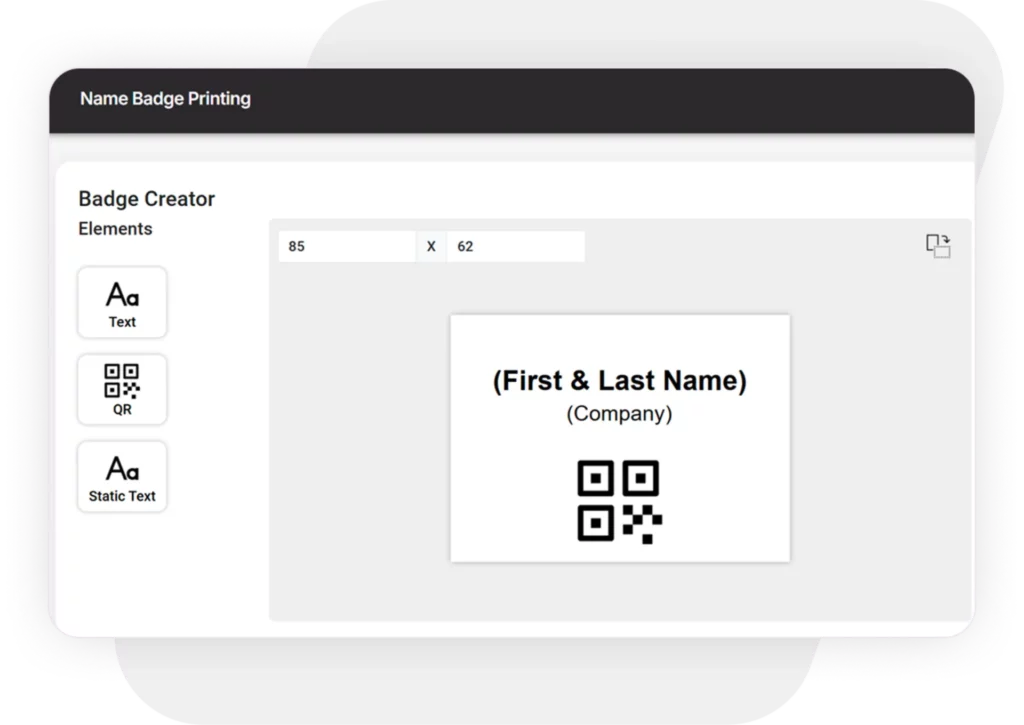
- A badge every 3 seconds. Design badges in the badge editor with QR codes, and switch templates on the iPad when a long name doesn’t fit.
- Search over scan. If a guest forgets their QR code, staff find them by name instead of stopping the line.
- Discreet duplicate handling. A second scan of the same code shows staff a private alert, not a public error.
- Data purged 24 hours after the event, with role-based access for staff.
It was used at a gala dinner for 2,000 guests with zero overbooked tables and no check-in delays. A PwC event coordinator wrote: “We printed name badges for 500+ people with the Check-in Pax App & Brother Label printers. The setup took only minutes.”
Trade-offs:
- It doesn’t sell tickets or process payments, and it isn’t an all-in-one suite (no venue sourcing or lead retrieval).
- It needs an internet connection. By design, staff must reconnect after a short grace period offline, so a lost device can’t open the guest list.
- The iPad and iPhone app prints natively to Brother label printers only, with the QL-820NWB recommended. The web app can print to any printer through the browser’s print dialog, but Check-in Pax recommends an iPad and a Brother printer for a print time of 2 to 3 seconds.
- The $250 license doesn’t send QR codes to guests before the event. That needs the $750 Manage License.
Hardware can be rented (iPads, Brother printers and Wi-Fi) through onsite support. The $2,500 Hire package adds remote support from a Check-in Pax expert; it doesn’t include equipment or onsite staff.
Cvent OnArrival
Best for: large enterprise events, especially when registration and the attendee app already run on Cvent.
- Check-in by searching name, email, company or confirmation number, on desktop, phone or tablet, with real-time check-in alerts and different guest types
- On-demand badge printing at check-in: badges are generated from registration data, with last-minute updates and easy reprints, and you can design on-brand badges. Cvent says it supports a variety of printer and badge types, but doesn’t list models on its public pages
- Walk-in registrations, self-serve kiosks and secure payment collection
- Basic check-in and attendee edits work offline once you log in and download the event, including badges, to the device. Walk-in registrations, payments and continuous syncing need a good venue connection
- Session check-in and capacity control, with attendance data that syncs to CRM or marketing automation platforms
- Two ways to buy: Event-in-a-Box, a self-service badging and check-in solution for VIP events, roadshows and recruiting events, and OnArrival 360, a full-service option led by a dedicated project manager with software, hardware, kiosks, printers, scanners, onsite setup, support and take-down
Trade-offs: Cvent doesn’t publish prices, and its Enterprise plan bundles OnArrival with Registration and Attendee Hub licences. On G2, Cvent Event Marketing & Management scores 4.3/5 from 2,455 reviews, with an average of about two months to implement. Tags that recur in reviews include registration issues, not intuitive, expensive, limited customization and learning curve. See our full Check-in Pax vs Cvent comparison.
Eventleaf
Best for: small-to-mid events on a budget with a simple check-in.
- A free Starter plan for up to 100 attendees a year, with unlimited events and users and no contract
- Paid plans are annual attendee bundles: Basic at $1 per attendee (500 attendees for $500) and Professional at $2 per attendee (1,000 attendees for $2,000)
- Badge design is in every plan, and badges can be printed in advance from the web app. The Check In app, which prints badges onsite, is included from the Professional plan; Eventleaf’s pricing page doesn’t list it under Starter or Basic
- Supports Apple AirPrint printers such as the Brother QL-820NWB (iOS), Zebra LINK-OS WiFi printers such as the ZD400, ZD420 and ZD600 (iOS and Android), and desktop printers on Windows
- Role-based badge layouts, conditional elements such as dietary indicators, and a self check-in kiosk mode where guests can review their details and reprint a badge
Trade-offs: onsite printing sits in the $2-per-attendee plan, and on iOS and Android the app prints labels only, through WiFi printers. Fees are annual and non-refundable.
Official site: eventleaf.com
Expo Pass
Best for: events that want registration, check-in and badge printing, plus the equipment and badge stock, shipped as one kit. Expo Pass says it covers events from about 100 to 10,000 attendees.
- Registration, onsite check-in and badge printing, lead retrieval, attendance tracking and an event app on one platform
- All-in-one kits with iPad kiosks, Zebra printers and network-redundant routers. Per its terms, the equipment is rented for the event, while badge shells and lanyards are sold as goods, and everything ships together
- Expo Pass says it handles its own print shop, software and hardware, plus equipment logistics, testing and onsite support, so you don’t manage separate rental vendors
- Branded badge shells are pre-printed in full color (4×6 or 4×3, single or double sided), and attendee details are printed on site on thermal printers, with no ink
- A drag-and-drop badge designer with multiple designs by registration type, QR codes and previews with real attendee data
- Plug-and-play setup, video tutorials and a support team on standby
Trade-offs: pricing is by custom quote, with no public price table. Per Expo Pass’s terms, each order sets a package price for specific events, with equipment rented for a rental period and badge shells and lanyards sold separately. Because the branded shells are printed in advance, the badge design is fixed before the event and only attendee details are printed onsite. Its terms say the services are offered to users in the United States.
Official site: expopass.com
Event badge printers: what to buy or rent
The printer matters less than the setup around it, but it should be compatible with your software before you buy or rent. Most event badge printers are thermal label printers. Two families show up most often: Zebra printers (Accelevents’ ZD series, the Expo Pass kits, and the ZD400, ZD420 and ZD600 that Eventleaf supports) and Brother QL label printers (the QL-820NWB used by the Check-in Pax iPad app and supported by Eventleaf on iOS). Cvent and Bizzabo don’t list printer models on their public pages.
Before you buy or rent, check:
- which printer models your software supports on the device you will use (iPad, Android or laptop)
- which label sizes fit your badge design
- whether the printer connects wirelessly or by cable
- how many printers your guest count needs. The Event Equipment Calculator gives a starting point for iPads and printers.
Event name badge printing: what to put on the badge
Keep the badge simple: first name, last name, company and a QR code. For different guest groups, such as attendees, speakers and VIPs, use separate badge templates. Check that long names fit before the doors open, and pre-print badges for VIPs in bulk so their check-in is instant. For the full process, see our guide to event check-in and badge printing.
Which tool should you choose?
- Choose Accelevents if you want printing built into a broader platform and your budget starts in the thousands per event.
- Choose Bizzabo if badge design and a full event platform matter more than price.
- Choose Check-in Pax if you run VIP events, galas or agency work, want pay-per-event pricing and don’t need ticketing.
- Choose Cvent OnArrival if you run large events and registration is already on Cvent.
- Choose Eventleaf if you run small events and need functional printing at a low entry price.
- Choose Expo Pass if you want badges, equipment and onsite software shipped to your event as one kit.
Frequently asked questions
What is the best event badge printing software?
There isn’t one best tool. Cvent OnArrival and Bizzabo suit large enterprise events, Accelevents suits teams that want printing inside a broader platform, Expo Pass suits teams that want a shipped kit, Eventleaf suits small events on a tight budget, and Check-in Pax suits agencies and VIP events that want to pay per event.
Do I need an annual subscription for badge printing software?
Not always. Bizzabo and Eventleaf bill annually, Cvent and Expo Pass price by quote (Expo Pass per event or package), and Accelevents starts at $7,500 for a single event. Check-in Pax charges per event, starting at $250, with no annual contract.
What badge printer works best for events?
It depends on your software. The Check-in Pax iPad app prints natively to Brother printers only (the QL-820NWB is recommended), while its web app can use any printer through the browser. Accelevents and Expo Pass use Zebra printers, and Eventleaf supports both Zebra and Brother. Check the supported models first.
Can badge printing software handle walk-ins?
Most platforms can. Accelevents lets walk-ins register at the kiosk, and in Check-in Pax you add a walk-in in two clicks and print their badge on the spot. Ask any vendor to show you the walk-in flow in a demo.
What if a guest forgets their QR code?
Staff can look the guest up by name and check them in without the code. Accelevents, Bizzabo, Cvent and Check-in Pax all support name search. Test how quickly it works in a demo before you choose a tool.
Bottom line
Every tool here prints badges. The choice comes down to pricing model, how much of the event stack you need, and how well the tool handles the unexpected at the door. If you run VIP events or agency work and want to pay per event, try Check-in Pax free for up to 20 guests.